Emergency cards for people and pets
Important information. Available exactly when it's needed.
With a zorVaro Emergency Card or SOS tag, you carry a personal QR code with you. After scanning, only the information you have approved for that card is shown — for people and pets, as well as items such as cars, wheelchairs, bags or laptops.
How the emergency cards work
One card. Up-to-date information when it's needed.
The zorVaro Emergency Card connects a physical card in your wallet or an SOS tag with a personal emergency page that can be opened by QR code. When the code is scanned, the information you have released for that card becomes available.
This can include contacts, important personal notes or information about caring for a pet. You decide which details are visible on each card.
Scan the QR code
Your personal QR code opens the corresponding emergency page in the browser. No special app is required.
Only selected information
You decide which information is released on each emergency page.
Choose how people can get in touch
Contact details can be displayed publicly, or a message can be forwarded through zorVaro without showing the contact details publicly. Available contact methods include email, SMS or voice calls for anonymous contact.
Optional PIN protection
Access to the emergency page can also be protected by a PIN if needed.
Get in touch
Reachable directly — or privately through zorVaro.
You decide how someone can get in touch after scanning an emergency card. Phone numbers or email addresses can be released directly on the emergency page. Alternatively, a message can be sent through zorVaro to the designated contact without displaying that person's contact details publicly.
Contact via zorVaro
If you prefer, the stored contact person's details remain hidden. A message is forwarded through zorVaro to the contact who is currently designated.
This is especially useful if you want someone to be reachable without publishing their phone number or email address on the emergency page.
Show contact details directly
Alternatively, you can release selected phone numbers or email addresses directly. This allows someone helping you to call or message the designated contact immediately.
You decide which contact details are shown.
When a contact person is temporarily unavailable
Substitutes are taken into account automatically.
A trusted contact may also be on vacation, ill or temporarily unavailable for another reason. You can therefore set a time-limited substitute for a contact.
If, during this period, someone uses the emergency card and chooses Contact via zorVaro the currently designated substitute is taken into account. The card itself does not need to be changed or reprinted.
Once the substitution period ends, the originally designated contact automatically becomes active again. If the change is permanent, a contact can also be replaced completely by another person.
Privacy to suit your needs
Direct access or additional PIN protection.
Not every piece of information has to be available immediately after scanning. Access to an emergency card can also be protected by a PIN.
Depending on how you use the card, you can decide whether fast direct access is more important or whether the emergency page should have an additional layer of protection.
Important: You decide which details you release on an emergency page. A PIN can provide additional protection, but it should be chosen and used in a way that still makes the card practical in the situation it is intended for.
For people and pets
The same idea for different situations.
Personal emergency card
For people, you can provide information such as emergency contacts, personal notes, allergies or intolerances, medications and other details you choose.
The card fits in your wallet and stays up to date even if the stored information changes later.
Emergency card and SOS tags for pets
For pets, you can store important care instructions, contact persons, veterinary information and other details you choose to release.
SOS tags can also make it immediately visible that up-to-date information about caring for the animal is available through the QR code.
Easy to understand internationally
The emergency page can adapt to the viewer’s language.
An emergency card may be scanned at home, while travelling or in a place where the person helping speaks a different language. That is why public zorVaro emergency pages are designed to be multilingual.
If a supported language is set in the browser, the emergency page can use it automatically. The language can also be changed directly on the page using the language selector.
Automatic language selection
The preferred browser language is detected and — if supported — automatically used for the emergency page.
21 languages
The interface and predefined labels are available in numerous European and international languages.
Also supports RTL languages
Arabic, Persian and Hebrew are displayed using the appropriate text direction.
Personal information remains unchanged
Individually entered text and free-text medical information are not automatically rewritten or translated.
What is localized?
The public emergency page interface and predefined labels such as “Name”, “Address”, “Date of birth”, “Emergency contact”, “Medications”, “Allergies” and “Important files” are shown in the selected language. Personal content remains exactly as it was entered.
Currently supported languages in zorVaro
German, English, French, Spanish, Italian, Dutch, Polish, Portuguese, Russian, Turkish, Arabic, Persian, Hebrew, Simplified Chinese, Traditional Chinese, Japanese, Korean, Czech, Swedish, Norwegian and Danish.
This helps keep a zorVaro emergency page easier to understand even when the person scanning the QR code uses a different language.
Example
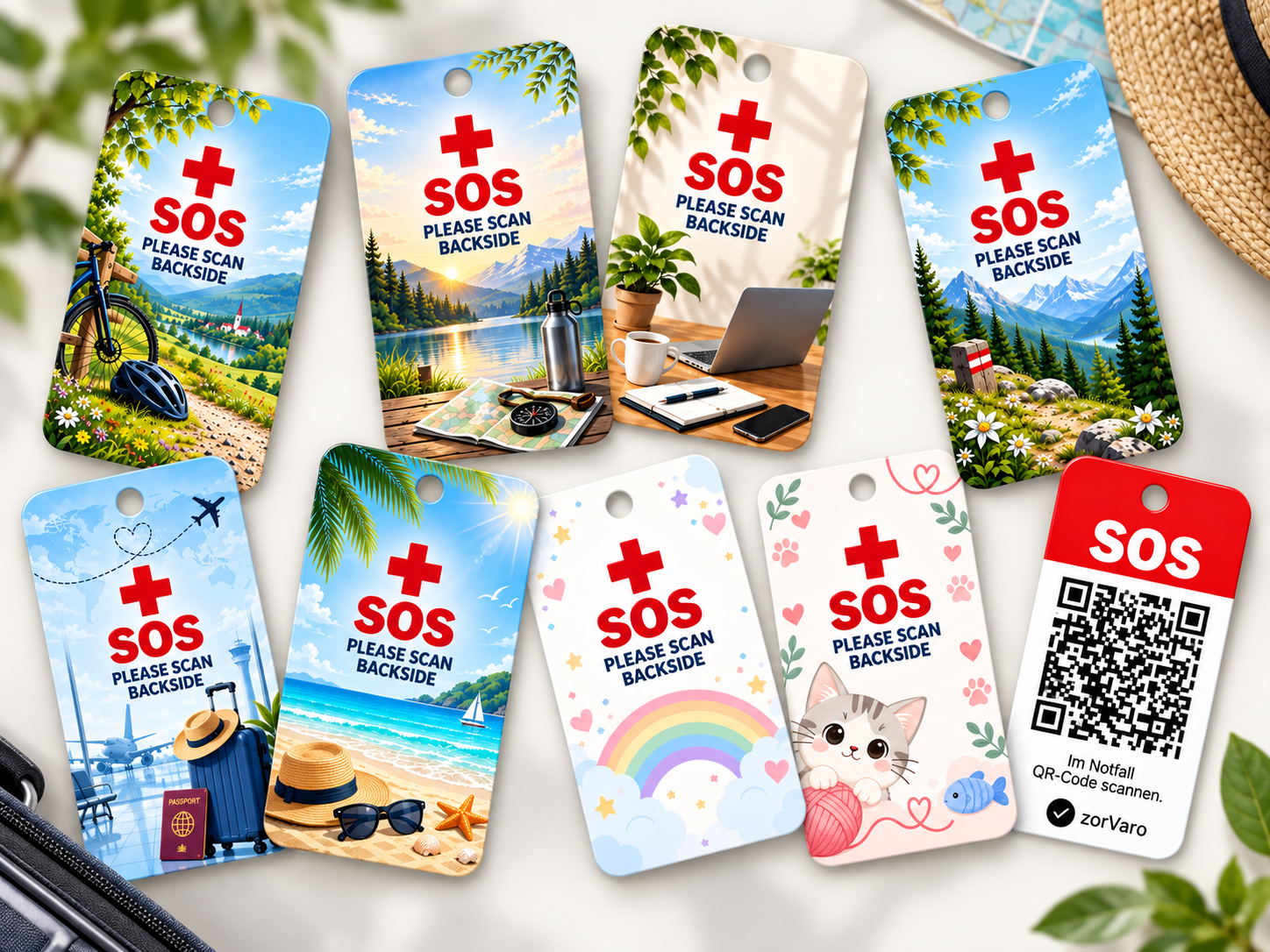
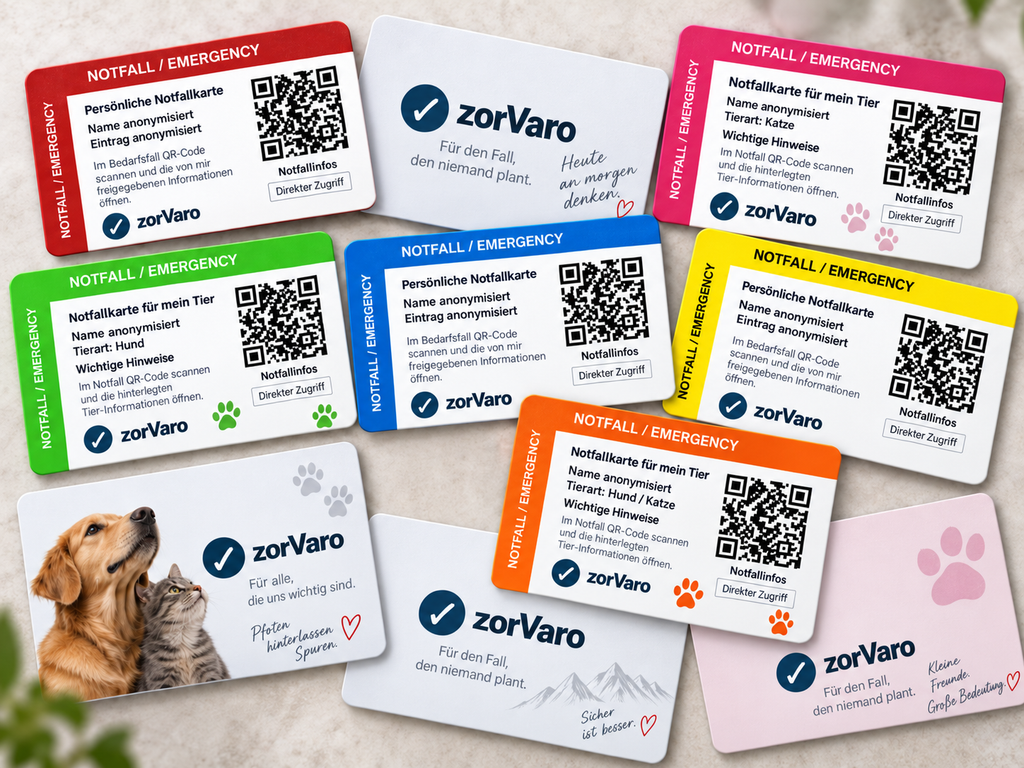
This is what the card, SOS tag and emergency page can look like.
The following images show an example SOS tag and a personal emergency page. Personal names have been anonymized for this illustration.
How it works
Your personal emergency card in three steps.
Set up the card
Choose the information and contacts that should be available through this emergency card and select the type of access you want.
Carry the QR code with you
Use the digital template, a finished card in your wallet or an SOS tag in the appropriate place.
Scan and inform
When needed, the QR code is scanned. The information you have released is opened and — if enabled — contact can be made.
Stays up to date
The QR code stays. The information can change.
If contact details, a substitute or other released information change later, simply update them in zorVaro. The QR code on an existing card or SOS tag stays the same.
That means you do not need to print or order a new card every time something changes.
Order professionally printed cards
Emergency card, SOS tags or a set.
Would you rather not make your emergency card or SOS tags yourself? Ready-made cards and tags can be ordered from the zorVaro shop and directly from the web app.
Finished emergency card
€19 each
Personal emergency card with your zorVaro QR code, professionally produced and ready for everyday use.
Worldwide shipping by DHL registered mail included.
Quantity discounts are available when ordering multiple cards.
Set: Emergency card + 3 SOS tags
€29 per set
One personal emergency card and three matching SOS tags with your zorVaro QR code.
Worldwide shipping by DHL registered mail included.
Quantity discounts are also available for multiple sets.
Quantity discounts: Need several cards, tags or sets — for example for a family, several pets or an organization? Individual volume pricing is available for larger quantities.
Learn more about using zorVaro in your organization here.
Good to know
An emergency card is an additional aid — it does not replace emergency services.
The zorVaro Emergency Card provides the information and contact options you have released. It does not detect a medical emergency and does not replace emergency services, medical alert systems or home emergency call systems.
In an acute emergency, always use the appropriate emergency number.
Your emergency information. As up to date as your zorVaro account.
Set up your personal emergency card and decide which information and contact options should be available when needed.